Skip to content
  • Instagram
  • Facebook
  • TikTok
  • Twitter
  • Youtube
Welcome to irenelaw.com

Welcome to irenelaw.com

Previously known as sweetsurrender.99.com.my

  • Home
  • About
  • Contact
  • Disclosure Policy

Category: Tech Stuffs

Some geeky stuffs.

Unveiling the Latest Huawei Mate50 Series on 3 November

Posted on November 1, 2022November 1, 2022 By sweet surrender No Comments on Unveiling the Latest Huawei Mate50 Series on 3 November

Malaysians will be getting the latest in smartphone advancements and more through the HUAWEI MATE50 Series’ launch, and that’s not all!

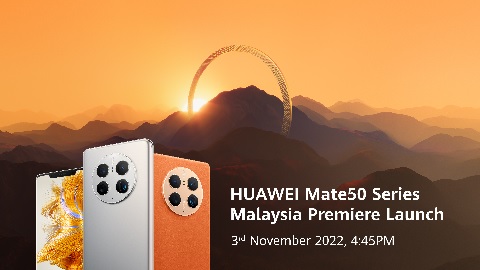
SOON, VERY SOON! HUAWEI Consumer Business Group (CBG) Malaysia, the leading global provider of information and communications technology (ICT) infrastructure and smart devices will be unveiling the most anticipated line of products of the year, the new Mate50 series on 3 November 2022 – allowing Malaysians to experience the best of elegant designs and innovative technologies that HUAWEI has to offer.

Unveiling the Latest Huawei Mate50 Series on 3 November

Enter the King of Flagship devices, HUAWEI Mate50 PRO, which will be sporting the latest EMUI operating system from HUAWEI. This flagship device will have the best-performing mobile camera imaging technology from its predecessors to give Malaysians an out-of-this-world experience while maintaining the classic space ring design with a delicate touch of the Clous de Paris pattern.

BUT WAIT! THERE’S MORE!

On top of the Mate50 Series, HUAWEI will also be introducing the brand-new nova 10 series, Watch GT 3 SE, and Matepad series! HUAWEI aims to meet every Malaysian’s requirement for a seamless and productive lifestyle by fusing the finest in both fashion and practicality. The nova 10 series, Watch GT 3 SE and MatePad series are making their debut on the same day and will enable consumers to do more with these superior digital companions.

In addition to the new line of products, HUAWEI will also be introducing the new EMUI 13 for the Mate50 Series. The new face of Huawei Mobile Service (HMS) is designed to create a smooth user experience as well as to complement the well-rounded flagship device – enabling HUAWEI to take a huge leap in usability, especially for the HUAWEI AppGallery. In order to serve the consumers better, ‘Sophia’, the AppGallery assistant will also be available to effectively resolve any concerns on HMS Apps-related issues.

Ensuring you don’t miss out on any exciting news or promotion such as their RM1 Exclusive Pre-order, visit HUAWEI Official Website to pre-order now and stand a chance to win amazing prizes from a prize pool worth up to RM15,000!

Also, don’t miss the launch of the HUAWEI Mate50 series and other exciting HUAWEI Products on 3 November 2022. Stay tuned to HUAWEI’s Official Facebook or click here to join in for the launch!

Public Events, Tech Stuffs

Realme C35 – How to Save Photos/Videos to SD Card

Posted on October 18, 2022October 19, 2022 By sweet surrender 1 Comment on Realme C35 – How to Save Photos/Videos to SD Card

Took me hours to finally figure out how to save photos/videos taken with Realme C35 camera to SD Card. I’m going to tell you how to do it in this post. I couldn’t find any solution online. If you are facing the same issue, this might help.

Realme C35 How to Save Photos/Videos to SD Card

It is actually very easy and straightforward. Insert the SD card and then switch on your phone. Follow the instructions on the screen. It will ask you to format it. Then you need to set it up.

How to do it?

On the setup page, there are two options. Namely, “Phone Storage” and “Portable Storage“. Choose “Portable Storage“.

I actually don’t quite remember the exact terms used in the setup page but “Portable” is the keyword!

Then you will be able to find it in “Settings” > “Storage” (refer to the image below)

Realme C35 How to Save Photos/Videos to SD Card

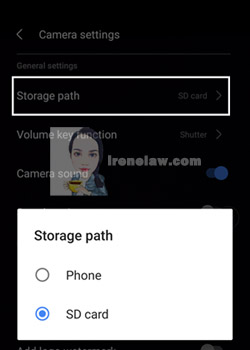
After that, remember to go to “Camera settings” and change the “Storage Path” to “SD Card“.

Realme C35 How to Save Photos/Videos to SD Card

Do note that this is only applicable for storing photos or videos you took with your camera. Any photos or videos saved or downloaded from other apps such as WhatsApp, Facebook, TikTok, websites, etc will not go into the SD card. I can’t find the global setting for it. You might have to set each of them one by one.

There you go. As simple as that! Why it took me ages? That was because I kept choosing the “Phone Storage” option.

If you did follow me on my Instagram and/or Facebook, you will know that I finally got myself a new phone after 4 years of using Huawei Nova 2 Lite. Will share about it once I’ve completed the video editing.

You can get the Realme C35 (4GB RAM + 64GB ROM) here in Shopee (https://invle.co/clen7pc). Mine is 6GB + 128GB ROM which you can find easily in physical mobile phone shops. While the SD card I’m using is SanDisk Ultra microSDXC USH-I 128GB (https://invle.co/clen7y8)

Realme C35, Tech Stuffs

ASMR Unbox & Quick Review of Wireless, No Battery, Rechargeable, Affordable, Silent Optical Mouse

Posted on March 31, 2022July 14, 2022 By sweet surrender No Comments on ASMR Unbox & Quick Review of Wireless, No Battery, Rechargeable, Affordable, Silent Optical Mouse

All my old mouses gave up on me at about the same time last time. I bought a new one from Shopee when it was having its 10/10 campaign. I bought it for less than RM10 (if I recall correctly, I did get some discounts by using some Shopee coins).

I’ve been using it now for about 5 months. It’s still serving me pretty well. I charge it about every 10 days. I’m quite a heavy user. It’s on for at least 12 hours a day. When the cursor started to slow down or it is not that responsive anymore, it’s time to charge.

You can use it while charging but make sure you are using a data cable. The in-built battery capacity is 500mAh. If the mouse is sleeping while you are not using it, just wake it up by scrolling the scroll wheel. The mouse will also go off when you switch off your computer.

All my old mouses(Logitech) lasted for at least 7 years while the oldest one lasted over 10 years. Not sure how long this mouse will last me. If you are looking for a mouse that does its job and doesn’t burn a hole in your pocket, you can consider this mouse. Here’s the direct link to the mouse I bought on Shopee https://invol.co/cl6rnrz

Review It!, Tech Stuffs, Vlog

[Vlog] Ep. 11: New External Microphone, SD Card – Fixed External Microphone Issue on Huawei Nova 2 Lite

Posted on May 25, 2019October 17, 2019 By sweet surrender No Comments on [Vlog] Ep. 11: New External Microphone, SD Card – Fixed External Microphone Issue on Huawei Nova 2 Lite


While people are busy announcing about the future of Huawei’s devices such as new OS, no more conventional SD card, I’m still stuck here telling you how to fix the external microphone problem and inserting a new SD card into it 😂

Here’s the links where you can purchase them:
HUACAM YYPJ-01-1 3.5mm Hands Free Computer Clip on Mini Lapel Microphone (3 X Lapel Microphone) https://amzn.to/33AewUn

SanDisk 64GB Extreme microSDXC UHS-I Memory Card with Adapter – C10, U3, V30, 4K, A2, Micro SD – SDSQXA2-064G-GN6MA https://amzn.to/2MkfxtY

Please subscribe to my channel at Lovebellbelle. Going to have new project coming in the channel. Stay tune!

Huawei Nova 2 Lite, Tech Stuffs, Vlog

[Vlog] Ep. 10: How to Upload Photo from Computer to Instagram (Google Chrome)

Posted on May 18, 2019May 28, 2019 By sweet surrender No Comments on [Vlog] Ep. 10: How to Upload Photo from Computer to Instagram (Google Chrome)

My SD card was corrupted few weeks back and all my photos are gone but good thing I have a backup in my computer. So, I was wondering how I can upload photo from my computer to my Instagram without using a mobile device. I did a search on the Net and found out that it is easy. I decided to make tutorial video of my own to share it with you 😉

Sorry guys if some of you couldn’t get it to work, I forgot to add in one more step. Mine works because I’ve been using this feature for other things and it’s already set that way, that’s why. Here you go… Make sure you press the “Toggle device toolbar”(the little icon with two rectangular thinggy above all the codes, at the left side of the “Elements” button) or press Ctrl+Shift+M to get the UPLOAD button at the bottom and the toolbar for device emulation and zoom in/out. Remember to refresh it again.

Hope you can subscribe to my Channel at https://bit.ly/lovebellbelle

Tech Stuffs, Vlog

Posts pagination

Previous 1 … 8 9 10 … 28 Next

Klook.com

Tweets by irenelaw

My NFT


ADOPT A SUNBIRD

I'm here too...


Lovebellbelle @ Instagram

Lovebellbelle @ Facebook

Lovebellbelle @ YouTube

Lovebellbelle @ TikTok

艾艾倪 @ 小红书

Lovebellbelle @ Lemon8

Latest Posts

  • 9th Day of CNY, Time to Eat Nian GaoFebruary 25, 2026
  • Happy Chinese New Year 2026February 17, 2026
  • Easy Golden Honey Corn FlakesFebruary 10, 2026
  • Easy Rice Paper Seaweed ChipsJanuary 29, 2026
  • HUAWEI MATE X7 IS NOW LAUNCHED IN MALAYSIA, SETTING A NEW BENCHMARK FOR FOLDABLE SMARTPHONESJanuary 20, 2026
  • A Free & Easy 4D3N KL Trip – Part 3January 13, 2026
  • A Free & Easy 4D3N KL Trip – Part 2January 8, 2026
  • HUAWEI SETS A NEW STANDARD FOR PC-LEVEL PRODUCTIVITY AS MATEPAD 12 X (2026) PRE-ORDERS OPEN IN MALAYSIAJanuary 6, 2026
  • Happy New Year 2026January 1, 2026
  • HUAWEI TEASES A PC-LIKE PRODUCTIVITY WITH THE ARRIVAL OF THE LATEST HUAWEI MATEPAD 12 X (2026) AND HUAWEI M-PENCIL PRO IN MALAYSIADecember 29, 2025

Latest Comments

  1. sweet surrender on Sara Lee Chocolate PieFebruary 14, 2026

    Is it? No more in the market. It's a nice cake. Unfortunately, I don't have any ingredients/recipe for it. I…

  2. Elyssa on Sara Lee Chocolate PieFebruary 14, 2026

    They discontinued it in Australia I was wondering if you could post the recipe/ ingredients

  3. A Free & Easy 4D3N KL Trip – Part 2 | Welcome to irenelaw.com on A Free & Easy 4D3N KL Trip – Part 1January 8, 2026

    […] already 2026! I’m still sharing my experience of my Free & Easy 4D3N KL Trip that I made back…

  4. sweet surrender on My New Laptop after 10 Over YearsDecember 22, 2025

    Really? Hope it helps.

  5. Angel on My New Laptop after 10 Over YearsDecember 21, 2025

    Thanks for reviewing this product. İ am from India and after searching for hours none of the tech reviewing person…

Featured Reviews

[Read more reviews]


Buy My Photos

Dreamstime
EyeEm

Recommended Sites

Categories

Blogging since 2002. Anything before 2006 is no longer available. It is no longer on this server. Back then, I built my own blog and updated it using HTML. No database or anything. Only started blogging fully with a CMS in 2006. However, whatever was on the Internet will stay on the Internet. So... It should be still somewhere on the Internet. Then again... Why do you want to dig that far?

Copyright © 2026 Welcome to irenelaw.com.

Powered by PressBook WordPress theme