

After more than 5 years going through all the ups and downs with me, finally my Sony Ericsson is official dead in Adelaide last few weeks ago. It’s my very first mobile phone using my own money to buy.

In fact, it already had problem when I was in Korea, had trouble charging it but after a few restarts it would work. It’s been on and off like this until finally last few weeks, it could no longer be charged. I thought it’s my battery problem so I bougth a new battery but after using the new battery for a week, when it’s time to charge, same thing happened.

So that’s the end of my SE K800i. The best part of this phone was its camera. The sound system was quite good too actually.

Oh wait… Think I’ve found some solutions to it, gonna try it after exam to see whether it works or not 😉

Category: Tech Stuffs
Some geeky stuffs.
Dropped My HTCHD7!!
🙁 I dropped my HTCHTD7 on the surface full of pebbles! Dropped hard too, from waist down and hit the ground with a “THUB” -.-” It didn’t swtich off, it didn’t came apart, everything is intact and no damage to the phone except ugly looking body now 🙁

Sigh… Think I should get the phone decoration stickers to bling the corner up now, I can’t stand seeing the damage. GAH!
ASUS External Slim DVD-RW
Last Sunday, a CD got stucked inside my laptop. We tried so many attempts and wasted so many hours trying to take it out but to no avail. GAH!! I had just formatted my laptop and because of that I couldn’t get any programme to installed. At the end, we decided to get an external DVD-RW. At the same time, asked the people at the shop to help take out the CD but they couldn’t get it out too.
OK! Don’t tell me to find the small hole to eject it, there’s no such thing with slot type optical drive. Very “smart” design indeed! It happened when I have no more warranty, so… What to do? Gonna live with the CD inside the drive and don’t care about it anymore.
In fact I could just take out the drive but it would require time. I really don’t have the luxury of time to tinker with it now. What’s more I have a project that I need to get it done and over with before next Monday. Besides, the drive is practically useless also, even if I managed to take out the CD, it’s not usable anymore unless I want to get another one stucked. At the end, still need to get an external drive.
Anyway, here’s the new ASUS External Slim DVD-RW. Market price is around RM200+
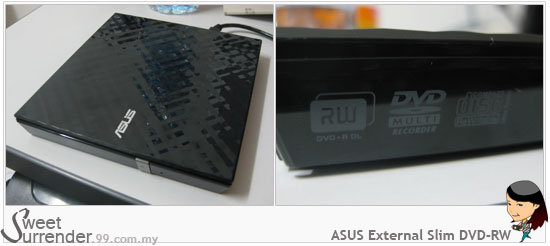
Very sleek right?
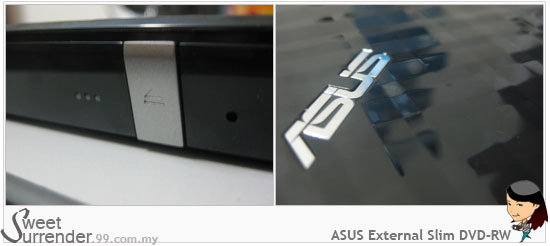
Not gonna review it, nothing to review at all LOL. It’s easy to use, plug and play. That’s all I can say.
Maxis10: HTC HD7: Radio
Apparently I’m not done with this review yet HAHAHA! Just realized I forgot about this radio feature but I promise you this is my last post for this Maxis10 review and today is also the last day of the review. I don’t want to return the phone!!!! ;p

I’ve been looking high and low for the radio function when I heard of it but I couldn’t seem to find it hmm… It’s in the Music+Videos tile duh~ How come I never notice? ;p
You need to use the earphone as it serves as the antenna for the radio. The earphone is quite big for my ear LOL.
Anyway, as you can see in the photos, see the second one? The numbers are blur. It’s because I took the photo while it’s tuning. Too bad… Max only reach 90.0FM… That’s the down side. The only station that I managed to get is 89.9FM.
One last post to end the review. Read the summary here…
Enjoy your weekend!!
Maxis10: HTC HD7: Summary
 In this post, I’m going to summarize everything about the good and bad features of the phone to conclude this round of review. As usual, just sharing my experience, from tech noob point of views and as a first-time smart phone user.
There are some people that did not like the remarks I made about how I could make the phone as my makeup mirror and also seeing myself in the reflection, I’m so gonna annoy you even more in this post! Hahaha… That’s my experience, that’s the fact, it’s really that reflective and it really can be used as an emergency mirror when one needs one. How so? Here you go… See how clear I can see myself in the reflection?
 What I like (in no particular order)
- Huge screen!!!
- Office Hub. Great for people like me who hate printing documents especially when it is not necessary to be printed.
- Good sound quality.
- Can arrange the tiles based on your usage for Start Screen.
- Battery life is quite lasting. Could last more than 12 hours with on and off streaming videos and songs, play some games, couple of calls and SMSes, web browsing, photo taking and etc.
- Huge “keypad”, easy typing/messaging.
- Easy navigation with sensitive touch screen.
- Kickstand for hands-free viewing.
- Clean interface design.
- Huge font.
- Voice search even though sometimes it’s not accurate.
- One touch Search.
- Xbox Live! Can play console-quality video games!!
- Camera function isn’t so bad with good lighting. Video function isn’t bad too and from others review, it’s doing quite good under low light condition.
- So easy to use, even tech noob like me knows how.
- Design is quite sleek.
 What I don’t QUITE like (in no particular order)
- The camera button is hard to press, can cause blur photo or shaky video. Hard to camwhore with it.
- Photos quality in low light isn’t impressive.
- It couldn’t remember my last setting of the camera but I heard such problem in other phones too.
- No copy and paste function.
- As big as my palm!!! I need to use two hands. Once got used to it, it’s fine actually. Just something that you might want to consider if you have small hands like me.
- Lack of application from HTC but can always find extras in the marketplace.
- Always accidentally pressed on the back or search button. Could be due to my small hand.
- It’s not comfortable putting the phone to the ear when answering or making calls because of the size and due to the ultra sensitive screen, my cheekbone will touch it and trigger the vibration. It surprised me a little because it suddenly vibrated hahaha…
- Can’t transfer Office files directly to the phone using cable and Zune.
- No “Malaysia” in the country list when you set up your phone with your Windows Live account.
- When people call and the phone is locked, you have to slide up to find button to answer the phone. Quite inconvenient.
- Can’t customize own ringtone and theme.
- The alarm cannot be used when the phone is off. I usually rely on my phone as my alarm to wake me up and I’m not the kind that will have my phone on 24/7. I’ll off my phone when I sleep. I almost overslept once because I didn’t know about this -.-“
- Can’t input Chinese character using pin yin. Downloaded some applications but can’t support pin yin input because they’re develop by the Taiwanese whom does not use pin yin.
- Cannot support Adobe Flash Player and open PDF files.
That’s my take on HTC HD7 after using it for almost 2 weeks.
Overall, the phone serves me well enough. It’s not really that bad. Those issues I had encountered aren’t that bad, I can live with them once I got used to them. However, I think that investing RM2K+ for it is not a very wise decision to make since you can get other phones which have almost similar specs or are better than this.
Then again, if you are the kind that needs Office Hub, wants good gaming experience, has eyesight problem and big fingers, you can consider this phone. You don’t have to invest RM2K+ for it because you can always get it with cheaper price with Maxis. Sign up for a 24-month contract, it will only cost you RM1399 while with the 12-month contract, the phone costs RM1699.

I’m ending my review of HTC HD7 with this post. Thanks Maxis for giving me the opportunity to experience a smart phone and trust me with it.
So sad… The phone will need be returned real soon and I’ll be switching back to my faithful old Sony Ericsson K800i. LOL… I have the oldest phone at home, even my dad is using a more advanced phone than mine ;p Oh well… I just don’t see any reason for me to upgrade my phone. Besides, I’m jinxed when it comes to buying electronic gadgets(those of you who knows me definitely know my stories). It’s still serving me well, don’t see the need to change unless I get to keep HTC HD7 hahaha…
On the other note, I might have to change the phone soon because I experienced some issues with my Sony Ericsson when I tried to use it the other day. OH NO! No money to get new phone 🙁 *HINT HINT LOL*
If you would like to learn more about HTC HD7, you can visit these lucky reviewers of Maxis10 who are also reviewing this phone:
http://blog.saimatkong.com/
http://thebackpackr.com/
http://www.hanep.org/
http://cyrildason.com/
http://blog.flymenigel.com/
http://www.msxeroz.com/
http://azmanishak.com/
http://obefiend.blogspot.com/
http://saffawati.com/